Choosing the right storage method is an important part of setting up a reliable WiFi CCTV camera system. A security camera may provide clear video, night vision, and remote monitoring, but these features are less useful if you cannot access recorded footage when you need it. Before buying a camera, it is important to understand where videos are stored, how long recordings remain available, and whether an internet connection is required.
The three common WiFi CCTV camera storage options are SD card storage, Network Video Recorder (NVR) storage, and cloud recording. Each option offers different benefits depending on your security requirements, budget, internet connection, and the number of cameras you want to install.
What Are the Main WiFi CCTV Camera Storage Options?
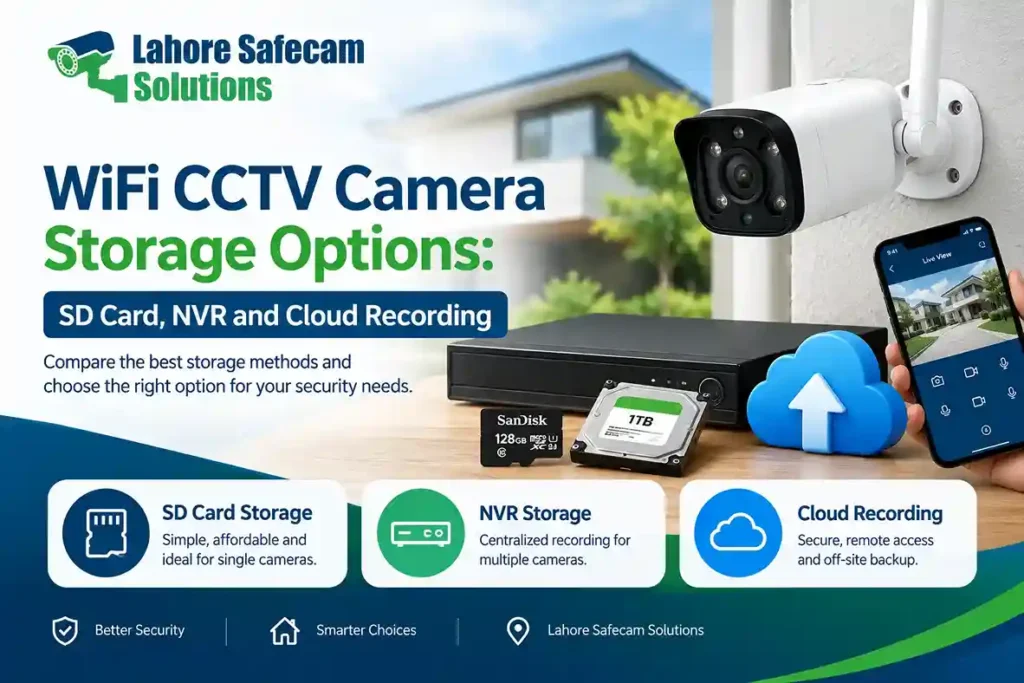
WiFi security cameras can store recorded footage locally or remotely. The available options depend on the camera model and its supported features. The three main methods are:
- SD card storage: Videos are saved directly to a compatible microSD card inside the camera.
- NVR storage: Recordings from compatible network cameras are saved to a hard drive connected to a Network Video Recorder.
- Cloud recording: Videos are uploaded to an online storage service, usually through the internet.
Some cameras support only one storage method, while others offer two or more options. Always check the manufacturer’s specifications before purchasing a camera.
1. How Does SD Card Storage Work in WiFi Cameras?
SD card storage is a convenient option for homeowners who need a simple recording solution without purchasing a separate recorder. A compatible WiFi camera can save footage directly to a microSD card installed inside the device. Once configured, the camera can record continuously or save clips when motion is detected. Many models also support loop recording, which allows the camera to overwrite older footage automatically when the memory card becomes full.
Benefits of SD Card Storage
- Easy installation without a separate NVR.
- Lower initial equipment cost.
- Suitable for individual indoor and outdoor cameras.
- Local recording may continue during an internet outage if the camera and recording settings support it.
- Recorded clips can often be viewed through the manufacturer’s mobile application.
What Are the Limitations?
The amount of footage you can store depends on card capacity, video resolution, compression, and recording settings. A camera recording continuously at a higher resolution will generally consume more storage than one saving short motion-triggered clips. An SD card also remains inside the camera. If the device is stolen or damaged, the stored footage may become inaccessible. For this reason, a memory card alone may not be the best choice for locations that require dependable long-term evidence. Choose a compatible, high-endurance microSD card designed for repeated video recording. Check the camera’s maximum supported capacity before buying one.
2. Can WiFi CCTV Cameras Record to an NVR?
A Network Video Recorder, commonly called an NVR, stores footage from compatible network cameras on a connected hard disk drive (HDD) or supported solid-state storage. This setup is useful when several cameras need to record to one central location. For example, a house in Lahore may have cameras covering the entrance, driveway, garage, and backyard. Instead of relying entirely on separate memory cards, a compatible NVR can collect and manage footage from multiple cameras.
Benefits of NVR Storage
- Centralized recording for multiple cameras.
- Larger storage capacity than a typical camera memory card.
- Easier playback and management of recordings from different locations around a property.
- Support for continuous recording, scheduled recording, or motion-based recording, depending on the system.
- Potential integration with compatible wired or wireless IP cameras.
What Should You Consider Before Buying an NVR?
Not every WiFi camera can connect to every NVR. Compatibility may depend on the manufacturer’s ecosystem, supported protocols, firmware, and network configuration. Some WiFi cameras use proprietary applications and do not support direct NVR recording. Confirm compatibility before purchasing equipment.
You should also select an HDD designed for surveillance recording. Standard desktop drives may not be ideal for systems that record video continuously throughout the day. An NVR can provide useful centralized storage, but the recorder and hard drive should be protected against unauthorized access, power problems, and physical theft.
3. How Does Cloud Recording Work for Security Cameras?
Cloud recording sends video footage to an online storage service through an internet connection. Depending on the camera and subscription plan, recordings may be saved continuously or as motion-triggered clips. One advantage of cloud storage is that footage can remain accessible even if the camera is damaged or stolen, provided the video was successfully uploaded before the incident.
Benefits of Cloud Storage
- Access recordings remotely through a supported application.
- Store footage away from the physical camera location.
- Reduce dependence on a memory card inside the camera.
- Simplify remote review and sharing of selected clips.
- Add an off-site backup option for important recordings.
Limitations of Cloud Recording
Cloud services generally require a reliable internet connection, and some features require a paid subscription. Upload speed, data limits, storage duration, and regional service availability can affect performance. Privacy is another consideration. Review the provider’s data policies, account security, encryption features, and available recording controls before enabling cloud recording. For homes and businesses in Pakistan, it is sensible to check whether your internet connection can support the camera’s upload requirements, particularly if several cameras are involved.
SD Card vs NVR vs Cloud Storage: Key Differences
The best storage method depends on how much footage you need to keep and how important off-site access is.
| Feature | SD Card | NVR | Cloud Recording |
|---|---|---|---|
| Storage location | Inside the camera | Local recorder and hard drive | Online server |
| Initial cost | Usually low | Usually higher | Depends on service |
| Multiple cameras | Separate cards are generally needed | Suitable for centralized recording | Depends on the service plan |
| Internet requirement | May record locally without internet | Local recording may continue without internet | Generally required for uploading |
| Remote playback | Depends on camera and app | Depends on network and system features | Usually available through a supported app |
| Storage capacity | Limited by card capacity | Depends on the installed drive | Depends on the subscription or service |
| Off-site backup | Not normally included | Requires a separate backup solution | Usually available for successfully uploaded footage |
A hybrid setup can also be useful. For example, a compatible camera may save footage locally to an SD card while uploading selected recordings to the cloud. This provides an additional layer of protection, although it depends on the camera’s supported features and internet availability.
How Much Storage Does a WiFi CCTV Camera Need?
Storage requirements depend on video resolution, bitrate, frame rate, compression, and the number of hours recorded each day. A higher-resolution camera generally produces more detailed footage but can also use more storage. Continuous recording usually requires more space than motion-triggered recording. As a rough example, a camera recording at an average bitrate of 2 Mbps uses approximately 21.6 GB per day. At that bitrate, seven days of continuous recording would require around 151 GB, before allowing for variations in bitrate and system overhead.
You can estimate storage requirements using this simple formula:
Storage in GB ≈ bitrate in Mbps × 10.8 × recording days
This is an approximate estimate for continuous recording. Actual usage varies by camera settings and video compression. If you need to keep footage for several days or weeks, consider the camera’s resolution, recording schedule, available storage capacity, and whether older recordings are automatically overwritten.
Can a WiFi CCTV Camera Record Without Internet?
Yes, some WiFi CCTV cameras can record without an active internet connection, but the result depends on the camera’s design and storage configuration. A camera with supported local SD card recording may continue saving footage even when internet access is unavailable. Similarly, a compatible camera connected to a local NVR may continue recording if the local network and recording equipment remain operational.
However, remote viewing, cloud uploads, notifications, and some smart features may stop working during an internet outage. It is also important to distinguish between WiFi and internet access. WiFi connects a camera to a local wireless network, while internet access allows communication with online services. A camera may retain local recording functionality without internet, but not every model supports this operation. Before purchasing a camera, ask the supplier to confirm its offline recording capabilities.
Which CCTV Storage Option Is Best for Your Needs?
The right choice depends on the property, number of cameras, and recording requirements.
- For a single room or small home: An SD card may be sufficient if you need basic local recording and occasional playback.
- For larger homes and businesses: An NVR is worth considering when you need centralized storage for multiple compatible cameras.
- For remote backup: Cloud recording can help protect important footage from the loss or theft of local equipment.
- For critical security areas: Consider a compatible combination of local recording and off-site backup, together with suitable power protection.
If you are planning a CCTV installation in Lahore, consider the layout of your property, WiFi coverage, power supply, internet reliability, and the length of time you need to retain recordings. These factors can help determine whether a standalone WiFi camera or a multi-camera recording system is more suitable.
Final Thoughts
Understanding WiFi CCTV camera storage options helps you choose a system that records reliably and keeps important footage accessible. SD cards provide simple local recording, NVRs support centralized storage for compatible cameras, and cloud services offer an off-site option for uploaded footage. Before choosing a system, compare storage capacity, recording duration, compatibility, internet requirements, and ongoing costs. Lahore Safecam Solutions helps homes and businesses in Lahore choose suitable CCTV cameras, recording equipment, and storage options based on their security needs. With proper installation and configuration, you can ensure your CCTV system records correctly and keeps important footage accessible when you need it.
FAQs: WiFi CCTV Camera Storage Options
Which storage option is best for a WiFi CCTV camera?
SD cards are convenient for individual cameras, NVRs are useful for centralized multi-camera recording, and cloud storage provides off-site access to uploaded footage. The best option depends on your budget and security requirements.
Do WiFi security cameras require an SD card?
No. Some cameras support NVR recording, cloud storage, or other manufacturer-supported recording methods. Check the specifications to confirm which options are available.
Can I use an NVR with a wireless CCTV camera?
Yes, if the camera and NVR are compatible. Confirm supported protocols, connectivity requirements, and recording features before purchasing them together.
Is cloud recording better than SD card storage?
Cloud recording can protect uploaded footage from the loss of the physical camera, while SD card storage offers simple local recording without a recurring cloud subscription. Some users benefit from both options.
How long can a WiFi CCTV camera save recordings?
Recording duration depends on storage capacity, bitrate, resolution, and recording mode. A larger drive or card generally stores more footage, while motion-triggered recording can extend retention time.
Does cloud recording work without internet?
Cloud recording normally requires internet access to upload footage. If the connection fails, local recording may continue if the camera supports an SD card or another local recording method.