Installing security cameras at home is an important step toward improving property security and monitoring daily activity. A well-planned CCTV system can help homeowners monitor entrances, driveways, garages, and other important areas while making recorded footage available when needed. However, installing cameras is not simply about choosing a device and attaching it to a wall. Camera placement, lighting conditions, wiring, recording storage, internet connectivity, and viewing angles all affect the performance of a home surveillance system.
For homeowners in Lahore, the right setup depends on the property’s layout, the number of areas that need monitoring, and whether the system will use wired IP cameras, traditional CCTV cameras, or wireless security cameras. This guide explains how to plan home security camera installation, choose suitable camera locations, configure recording equipment, and avoid common installation mistakes.
What Should You Plan Before Installing Home Security Cameras?
Before purchasing equipment, identify the areas you want to monitor. Every property has different security requirements, so the camera layout should be based on the building rather than a standard package. Start by checking the main entrance, back door, garage, driveway, boundary walls, and other accessible areas. Consider whether you need indoor monitoring for hallways or shared spaces as well.
Your installation plan should account for:
- The number of entrances and vulnerable access points
- Indoor and outdoor camera locations
- Required image detail and night vision
- Available power and network connections
- Recording duration and storage capacity
- Remote viewing through a mobile phone
- Protection against rain, dust, and heat
A simple property may need only a few carefully positioned cameras, while a larger house may require additional coverage. Planning these details in advance helps avoid unnecessary equipment costs and poorly positioned cameras.
Where Should Security Cameras Be Installed at Home?
Camera placement has a direct effect on how useful your CCTV system will be. Even a high-resolution camera may produce limited results if it points toward the wrong area or leaves important entrances outside its field of view.
Main entrance and front door
The main entrance is one of the most useful places for a security camera. Positioning a camera to cover the approach and doorway can help you monitor visitors and activity near the entrance. Check the camera angle to ensure that faces are visible and that bright sunlight does not consistently affect the image.
Back doors and side entrances
Back doors and less visible side entrances may also need monitoring. These locations can be overlooked when planning a residential CCTV installation. Choose a suitable angle that captures the approach to the entrance without unnecessarily recording neighbouring private areas.
Driveway and garage
A camera covering the driveway or garage can help monitor vehicles and movement around the property. Consider the distance between the camera and the area you want to observe. If you need to identify vehicle details, select a camera with suitable resolution and lens specifications rather than relying on resolution alone.
Indoor hallways and common areas
Indoor security cameras can be useful in hallways, entry areas, and other appropriate shared spaces. Position them to cover movement between important areas while respecting the privacy of household members and visitors. Avoid placing cameras in bathrooms, bedrooms, or other private spaces where surveillance would be inappropriate.
Choosing Indoor and Outdoor Security Cameras
Not every camera is designed for the same environment. Indoor and outdoor cameras have different installation requirements, so check the manufacturer’s specifications before choosing a model.
- Indoor security cameras are generally suitable for hallways, living areas, and other indoor locations. Depending on the model, they may include motion detection, two-way audio, and mobile app monitoring IMOU Ranger 2.
- Outdoor CCTV cameras should be designed to withstand the environmental conditions at the installation location. Look for an appropriate weather-resistance rating and consider exposure to rain, dust, direct sunlight, and temperature changes.
For homes in Lahore, outdoor camera selection should account for hot weather, dust, and seasonal rain. Correct mounting and cable protection are also important for long-term reliability.
Wired vs. Wireless Home Security Cameras
Is table ko “Wired vs. Wireless Home Security Camera Installation” section mein add karein.
| Feature | Wired CCTV Cameras | Wireless Security Cameras |
|---|---|---|
| Connection | Physical video or network cables | Usually Wi-Fi for video transmission |
| Power supply | Cable or separate power source, depending on type | Power adapter, battery, or supported power option |
| Installation | Cable routing may require more work | Often easier where cable routing is difficult |
| Connection reliability | Stable when correctly installed | Depends on Wi-Fi signal and network quality |
| Recording | DVR, NVR, or supported storage | NVR, memory card, cloud, or supported storage |
| Best suited for | Permanent home CCTV systems | Homes needing flexible camera placement |
| Main consideration | Cabling and installation requirements | Wi-Fi coverage and power availability |
Note: Wireless cameras are not necessarily cable-free. Most still require a power source unless they use batteries or another supported power arrangement.
CCTV Wiring, DVR, NVR, and Recording Storage
Recording equipment is an important part of home security camera installation. The appropriate setup depends on whether you choose analog cameras, network IP cameras, or a compatible wireless system. A DVR is commonly used with analog CCTV cameras, while an NVR is designed for network video cameras. Some systems can also use local memory cards or cloud storage, depending on the product. Before installation, confirm that the cameras and recorder are compatible. Check the number of supported channels, resolution limits, network requirements, and available storage.
Storage capacity depends on several factors, including:
- Number of connected cameras
- Video resolution and frame rate
- Continuous or motion-based recording
- Video compression settings
- Desired recording retention period
If you need to review footage from previous days, calculate storage requirements before choosing a hard drive. A system that records continuously generally needs more storage than one configured for event-based recording. Cables should be routed neatly and protected from accidental damage. Outdoor connections may require suitable weather protection, and network equipment should be installed in a secure, ventilated location.
Setting Up Mobile Viewing and Remote Monitoring
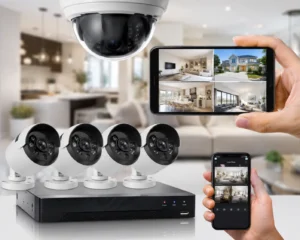
Many modern CCTV systems allow homeowners to view cameras through a compatible mobile application. Remote viewing can be useful when you are away from home or want to check an entrance while at work. Depending on the equipment, mobile access may provide live video, recorded playback, motion alerts, and camera status information. To configure remote monitoring, the installer should verify the network connection, configure the supported application, and test access on the owner’s device. Use strong passwords and keep the camera firmware updated when updates are available. Avoid sharing account credentials unnecessarily, and enable additional account security features where supported.A camera system should be configured securely rather than left with default passwords or unnecessary remote access.
Common Home CCTV Installation Mistakes
Several avoidable mistakes can reduce the effectiveness of a residential security camera system.
- Poor camera positioning: A camera may miss important activity if its viewing angle is too narrow or its position creates blind spots.
- Ignoring night-time lighting: Test the camera after dark. Reflections, glare, and insufficient lighting can affect image quality.
- Weak Wi-Fi coverage: Wireless cameras may disconnect if the network signal is unreliable at their installation locations.
- Insufficient recording storage: A small hard drive may not retain footage for the required period.
- Incorrect outdoor protection: Unprotected connections and unsuitable equipment can lead to reliability problems.
- Skipping system testing: Every camera should be checked for live video, recording, playback, and remote access where applicable.
A final inspection helps identify these issues before the installation is considered complete.
How to Test Your Home Security Camera System
After installation, check each camera individually. Confirm that the camera displays a clear image and covers the intended area without major obstructions. Test the system during both daytime and night-time conditions. Review recorded footage to make sure the recorder is saving video correctly, and confirm that the date and time settings are accurate. If mobile monitoring is included, test it using the owner’s phone and the network connection normally used away from home. Also confirm that the owner understands how to review recordings, manage users, and identify basic system alerts. Clear handover instructions make the system easier to use and maintain.
Home Security Camera Installation in Lahore
Professional CCTV installation can help homeowners plan camera coverage, select compatible equipment, route cables, configure recording, and set up mobile viewing. For a property in Lahore, the installation plan should reflect the building layout and the actual security requirements. A small house, a multi-storey home, and a property with a large driveway may all require different camera arrangements. Before accepting a quotation, ask which cameras and accessories are included, whether the recorder and hard drive are part of the package, what installation work is covered, and whether configuration and testing are included. For advice about a suitable setup for your property, you can contact our team to discuss your home security camera installation requirements.
Final Thoughts
Effective home security camera installation starts with a clear plan. Choosing suitable camera locations, checking outdoor protection, selecting compatible recording equipment, and testing night vision and remote access can make a significant difference to the finished system.
Instead of selecting cameras based on price alone, consider the areas you need to monitor and the level of image detail and recording time required. A properly planned residential CCTV system can provide useful monitoring for everyday home security while remaining practical to operate and maintain.
Frequently Asked Questions
How many security cameras does a home need?
The number depends on the size and layout of the property, the number of entrances, and the areas requiring monitoring. Identify important access points first, then plan additional cameras where coverage is needed.
What is the best place to install home security cameras?
Common locations include the main entrance, back door, driveway, garage, and suitable indoor hallways. The ideal position depends on the camera’s viewing angle, lighting, and the area you want to monitor.
Are wired or wireless security cameras better for homes?
Wired systems can provide a reliable permanent connection and are often suitable for central recording. Wireless cameras can simplify installation where cable routing is difficult, but they still need power and reliable Wi-Fi unless designed for another connection method.
Can I view my home CCTV cameras on my mobile phone?
Many modern IP and wireless CCTV systems support mobile viewing through compatible applications. The system must be configured correctly and have the network connectivity required for remote access.
Do home security cameras work at night?
Many security cameras include infrared night vision or low-light features. Actual performance depends on the model, lighting conditions, camera placement, and distance from the subject.
How long can CCTV cameras record footage?
Recording duration depends on the number of cameras, storage capacity, video settings, and whether recording is continuous or event-based. Check these requirements when selecting an NVR, DVR, or other storage option.
Should home security cameras be installed professionally?
Professional installation can help with camera placement, cable routing, recorder configuration, network setup, and testing. It is especially useful for multi-camera systems or properties with complex layouts.