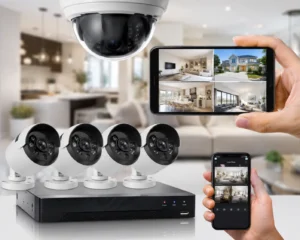
Installing CCTV cameras is not just about fixing cameras to walls and connecting them to a recorder. A reliable security system depends on correct camera positioning, suitable cabling, stable power, recording settings, storage capacity, and thorough testing. For homeowners in Lahore, these details matter even more because outdoor cameras may face dust, heat, rain, voltage fluctuations, and periods of power interruption. This CCTV installation quality checklist explains what you should inspect before accepting a newly installed home security system.
How Do You Check the Quality of a CCTV Installation?
A good CCTV installation should provide clear coverage of important areas, minimise blind spots, record footage reliably, remain stable during normal operation, and allow you to retrieve recordings when required. Check the camera positions, image quality, night vision, cable management, power supply, DVR or NVR settings, storage capacity, mobile access, and playback before considering the installation complete. The system should not simply look neat. It should work effectively in real situations.
Start With the Areas That Actually Need Surveillance
Camera placement is one of the most important parts of any CCTV installation checklist. Before cameras are installed, identify the areas where someone could realistically enter or move around the property.
For a typical Lahore home, these may include:
- main entrance or gate
- driveway or car parking area
- front door
- side access
- rear entrance
- boundary wall access points
- staircase or shared passage
- rooftop access
The exact layout will depend on the property. A small house may need only a few carefully positioned cameras, while a larger property may require more coverage. Camera quantity should therefore be based on security zones rather than an arbitrary number.
Check for CCTV Blind Spots
Installing more cameras does not automatically provide better security. What matters is the field of view created by each camera. Stand in the areas you want to monitor and check whether objects such as pillars, trees, walls, gates, or parked vehicles block part of the image. A camera positioned too high may provide a wide overview but make facial identification difficult. A camera positioned too low may become easier to interfere with. Professional CCTV installation should balance camera height, viewing angle, identification distance, and the area being monitored. The aim is not simply to see movement. Important cameras should provide enough useful detail to understand what happened.
Test Image Quality During the Day and at Night
A camera that looks clear at midday may perform very differently after dark. Night-time testing should therefore be part of every CCTV installation quality checklist. Check whether you can clearly distinguish: faces near entrances, vehicles entering the property, movement near the gate, and activity around darker parts of the building. Look for common night-vision problems such as: IR reflection from nearby walls, overexposed faces, glare from lights, blurred movement, and dark areas outside the camera’s effective range. Infrared cameras normally switch to black-and-white footage in low light. Full-colour night vision systems may provide colour images when suitable lighting is available. Whichever technology is installed, test it under the actual lighting conditions around your home.
Make Sure Outdoor Cameras Are Suitable for Their Position
Outdoor CCTV cameras need protection from weather and environmental exposure. Check the camera’s specified ingress protection rating. Ratings such as IP66 or IP67 are commonly used for outdoor security equipment, but the appropriate specification depends on where the camera is installed. A weather-resistant camera can still develop problems if poorly positioned. Installers should avoid locations where water can collect around connections or where cables remain unnecessarily exposed. In Lahore, dust can also accumulate on exposed camera lenses over time. Positioning cameras where they can be safely accessed for occasional cleaning can make long-term maintenance easier.
Inspect CCTV Cabling and Cable Management
Cabling is often hidden after installation, which makes it easy to overlook. Poor cable installation can cause unstable video, power problems, and difficult maintenance later. For IP camera installations, Cat6 cabling is commonly used to transmit network data, while many systems use PoE connections so power and data can travel through the same Ethernet cable. Traditional analogue CCTV systems may use coaxial cable with separate or combined power connections. Whichever system is used, inspect visible cables. They should be: properly secured, protected where necessary, labelled where useful, and kept away from obvious damage risks. Loose cables hanging along external walls are not a sign of good installation workmanship. Cable joints and connectors also deserve attention because weak connections can result in intermittent camera signals.
Check the DVR or NVR Configuration
The recorder is the centre of the CCTV system. Analogue and HD-over-coax systems normally use a DVR, while IP camera systems commonly connect to an NVR. Do not accept an installation without checking the recorder. Confirm that every camera appears correctly on screen and that each channel is labelled clearly.
For example: Front Gate is much more useful than Camera 03 during an emergency.
Also check: recording resolution, frame rate, recording schedule, date and time, motion detection settings and video quality. The date and time deserve particular attention. Incorrect timestamps can make recorded footage much harder to use later.
Confirm That Every Camera Is Recording
A live picture does not always mean footage is being saved. This is one of the most important checks after installation. Ask the installer to record several minutes of footage and then open the playback section. Select different cameras and timestamps. Make sure the recorder can: find footage, play it smoothly, move between cameras, and export a video clip when required. This simple test confirms that the cameras, recorder, and storage system are actually working together.
Check CCTV Storage Capacity
CCTV footage is normally stored on a hard drive installed inside the DVR or NVR. How long recordings remain available depends on several factors, including: number of cameras, camera resolution, frame rate, compression format, recording schedule, and hard drive capacity. A higher-resolution system usually generates more data than a lower-resolution setup. Ask how many days of recording the proposed storage configuration is expected to provide under your actual settings. Avoid assuming that installing a large hard drive automatically guarantees a particular number of recording days. Storage requirements should be calculated according to the system configuration.
Test Power Backup for Lahore Conditions
A CCTV system cannot provide continuous monitoring if the cameras and recorder lose power. For Lahore homeowners dealing with occasional electricity interruptions, CCTV backup should be considered during installation rather than afterwards. A UPS backup may be used to keep the recorder, cameras, and necessary networking equipment operating during short power failures. But simply connecting the DVR or NVR to a UPS is not always enough. If IP cameras depend on a PoE switch or router, those devices may also require backup power. Test the complete system. Switch off the main supply temporarily and check whether cameras remain online, recording continues, and the network equipment stays powered. This provides a much better indication of backup performance than simply seeing a UPS beside the recorder.
Protect the System From Unstable Power
Voltage fluctuations and electrical faults can affect electronic equipment. The CCTV power setup should therefore be installed carefully. Check that suitable power supplies are used and avoid overcrowded adapters or loosely connected extension boards. Where appropriate, discuss surge protection and voltage protection with the installer or a qualified electrical professional. The goal is to provide stable power to the cameras, recorder, and networking equipment.
Secure Your DVR or NVR
A recorder should not be left in an obvious, easily accessible location. If someone can quickly remove the DVR or NVR, locally stored CCTV footage may disappear with it. Choose a location that is: ventilated, reasonably protected, accessible for maintenance, and not immediately obvious to visitors. Ventilation matters because recorders and hard drives generate heat during continuous operation. Do not place the recorder inside a tightly sealed cabinet without considering airflow.
Test Remote Viewing Properly
Many modern systems allow homeowners to view cameras through a mobile application. Before completing the installation, test remote access using both the home Wi-Fi connection and mobile data. Check whether all cameras load, live video is stable, playback works where supported, and notifications operate correctly. Strong account security also matters. Change default passwords and use a unique password for the CCTV system. If the platform supports additional account-security features, consider enabling them. Remote viewing should provide convenience without weakening the security of the system itself.
Check Motion Detection and Notifications
Motion alerts can be useful, but poorly configured detection may generate constant notifications. Trees moving in the wind, vehicles outside the property, shadows, or activity beyond the boundary can sometimes trigger unnecessary alerts. Ask the installer to configure detection zones around areas that actually matter. These might include: the gate, entrance path, driveway, rear access, or a restricted section of the property. Then test the alerts by walking through those zones. Fine-tuning motion detection usually produces better results than simply setting maximum sensitivity.
What Are the Most Common CCTV Installation Mistakes?
Several installation problems can reduce the effectiveness of an otherwise good camera system. Common issues include cameras facing strong lights, important areas being left outside the field of view, poorly protected outdoor connectors, incorrect recorder time, insufficient storage, weak cable management, and failure to test night footage. Another mistake is focusing entirely on camera specifications while ignoring installation quality. A good camera in the wrong location can perform worse than a more modest camera installed correctly.
Final CCTV Installation Quality Checklist
Before approving CCTV installation in your Lahore home, confirm that:
- important entrances and access points are covered
- blind spots have been checked
- faces and vehicles are visible where required
- night vision has been tested
- outdoor cameras and connections are properly protected
- cables are secured
- Every camera is recording
- DVR or NVR time and settings are correct
- Playback and footage export have been tested
- Storage capacity matches your needs
- Backup power has been checked
- The recorder is stored securely
- Mobile viewing works
- Default passwords have been changed
A professional CCTV installation should leave you with a system you understand and can test yourself.
Final Thoughts
A reliable home security system depends on much more than camera resolution or brand name. CCTV camera placement, wiring quality, storage, backup power, recorder configuration, and testing all contribute to the final result. For Lahore homes, factors such as outdoor exposure and power continuity should also be considered during planning. Use this CCTV installation quality checklist before accepting a new system or when reviewing an existing setup. If every camera provides useful coverage, footage records correctly, backup power works, and recordings can be retrieved when needed, you are much closer to having a CCTV system that performs as intended.
FAQs: CCTV installation quality checklist
How can I check if my CCTV installation is done properly?
Check camera placement, blind spots, night vision, recording quality, cable management, storage, backup power, mobile viewing, and DVR or NVR settings. You should also test playback to confirm that footage is being recorded and can be retrieved correctly.
What should be checked after CCTV installation?
After installation, confirm that every camera is recording, timestamps are correct, important areas are covered, night footage is clear, storage is working, and remote viewing is accessible. Backup power should also be tested if a UPS is installed.
What are the most common CCTV installation mistakes?
Common mistakes include poor camera positioning, uncovered blind spots, exposed cables, incorrect night-vision angles, weak power connections, insufficient storage, incorrect timestamps, and failing to test recorded footage before completing the installation.
Where should CCTV cameras be installed around a Lahore home?
Common locations include the main gate, front entrance, driveway, rear access, side passage, rooftop entrance, parking area, and other access points. The exact placement should depend on the property’s layout and areas that genuinely need monitoring.
Does a CCTV system need UPS backup in Lahore?
A UPS can help keep CCTV cameras and recording equipment operating during short electricity interruptions. For IP systems, the NVR, PoE switch, router, and cameras may all need backup power if continuous recording and remote access are required.