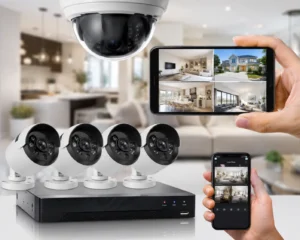

Yes, many CCTV cameras can continue recording without an internet connection. That answer often surprises homeowners and business owners because CCTV, WiFi, and internet access are frequently treated as though they are the same thing. They are not. A traditional DVR system can record footage directly to a local hard drive without being connected to the internet.
Many NVR systems can do the same with compatible IP cameras connected through a local network. What you usually lose when the internet goes down is remote access, cloud storage, and certain app-based features. For anyone considering Cameras Work Without Internet in Lahore, the important question is not simply whether the cameras can work offline. It is which functions you still need when your connection is unavailable.
Internet Is Not the Same as CCTV Recording
A camera captures video. A recorder stores it. A monitor can display it. None of those steps automatically requires an internet connection. This is especially straightforward with an analogue CCTV setup. Cameras connect to a DVR, and the DVR saves footage to an internal CCTV hard drive. If the internet connection disappears, the cameras can still send video to the DVR and the recorder can continue saving it, provided the equipment has electricity and there is no separate system fault.
The internet becomes relevant when you want the system to communicate outside the property. That could include checking cameras from your phone while at work, accessing recordings from another city or uploading footage to cloud storage. This distinction is one of the most important things to understand when choosing CCTV cameras without internet.
WiFi and Internet Are Two Different Things
WiFi is a way for devices to communicate wirelessly over a local network. Internet access connects that network to services outside your property. You can therefore have a functioning WiFi network without an active internet connection. For example, an IP camera may communicate with an NVR over a local network even when the broadband connection is unavailable. Likewise, a computer connected to the same local network may still be able to access some CCTV functions depending on how the system has been configured.
This matters when comparing CCTV without WiFi and CCTV without internet. A wired CCTV system may require neither WiFi nor internet for basic local recording. A wireless camera, however, may depend on WiFi to communicate with another device even if it does not need internet for every feature. The exact answer depends on the camera and recording method.
Can a DVR Work Without Internet?
A DVR is designed to record video locally from compatible CCTV cameras. The footage is usually stored on an internal hard drive.
Internet access is not normally required for:
- Local video recording
- Playback through a connected monitor
- Viewing live cameras on the local system
- Saving footage to the internal hard drive
- Basic system configuration
A connection becomes useful when you want remote features. For example, if you want to open an app on your phone while away from home and see your cameras, the DVR generally needs access to the internet. This makes DVR-based systems a practical choice for users who want dependable CCTV recording without internet but still want the option of remote viewing when connectivity is available.
Can an NVR Record Without Internet?
An NVR can also record without a live internet connection when the cameras and recorder are communicating over the required local network. IP cameras send video digitally, often through Ethernet connections. In a PoE CCTV setup, compatible cameras can receive both network connectivity and electrical power through Ethernet cabling connected to a suitable NVR or PoE switch. The local network handles communication between the cameras and recorder. The wider internet is not necessarily involved.
This means an NVR without internet can continue saving local footage if the system is set up correctly. The situation changes with cameras designed mainly around cloud services. Some consumer cameras rely much more heavily on internet connectivity, so their offline capability should always be checked before purchase.
What Stops Working When the Internet Goes Down?
This is where the practical difference becomes obvious. Your cameras may still be recording, but certain convenience features can disappear.
- Remote Mobile Viewing: If you are away from the property, your phone needs a way to communicate with the CCTV recorder. Without an internet connection at the CCTV location, remote viewing will normally become unavailable.
- Remote Playback: The same applies when you want to review previously recorded footage from outside the local network. The recording may still exist on the DVR or NVR, but you may need to return to the property or restore connectivity before accessing it remotely.
- Cloud Storage: Cloud recording depends on uploading footage to an online service. No internet means no continuous upload. Local storage and cloud storage should therefore be treated as separate recording methods.
- Online Notifications: Some motion alerts, push notifications and smart-camera features depend on external servers. These functions may stop until internet access returns. This is why buyers should decide whether they need local recording, remote monitoring, cloud storage, or all three.
What Happens When the Internet Returns?
For a locally recorded system, an internet outage does not necessarily create a gap in the saved footage. Suppose your connection goes down for two hours. If the cameras, DVR or NVR and hard drive continue functioning, those two hours may still be recorded locally. Once the connection comes back, remote viewing can resume. However, cloud-only features may behave differently. If footage was supposed to be uploaded continuously to the cloud, missing internet connectivity may create a period that was never uploaded. Some devices can temporarily save footage locally and synchronise later, but this depends entirely on the product. Never assume that every wireless or cloud camera behaves the same way.
Does an IP Camera Need Internet?
An IP camera needs a network connection, but that does not always mean it needs the internet. This difference is worth remembering. An IP camera connected to a local NVR can often send footage across the internal network without using an external internet service.
Internet access becomes necessary when the user wants features such as:
- Remote viewing
- Cloud backup
- External notifications
- Online account services
- Some firmware or smart features
For a household looking for an offline CCTV system in Lahore, an IP camera and NVR arrangement can still be suitable if local recording is configured properly.
What About Wireless CCTV Cameras?
The answer depends on what wireless means in the particular system. Many wireless cameras use WiFi for video transmission but still need a mains power connection. Some record to a microSD card. Others send footage to an NVR. Some are designed primarily around a cloud platform. A wireless camera that saves locally may continue recording when the internet fails while remaining connected to the local WiFi network. A cloud-dependent camera may lose much more functionality.
Before buying a wireless CCTV system, check three things:
- Where is the footage stored?
- Does local recording continue without internet?
- Can recordings still be accessed locally?
Those questions are more useful than simply asking whether the camera is wireless..
Internet Failure and Power Failure Are Not the Same Problem
This difference is particularly important for Lahore properties. If the internet fails but the cameras and recorder still have electricity, local recording may continue normally. If the electricity fails, the situation is different. Cameras cannot record if they have no power. A DVR or NVR cannot save footage if it switches off. This is why UPS backup can matter more to continuous recording than internet availability.
For a complete 2 MP CCTV setup, backup power may need to cover:
- Cameras
- DVR or NVR
- PoE switch
- Router, if remote features are required
- Other networking equipment
During load shedding, powering only the recorder is not enough if the cameras themselves are off. A reliable system should be planned as a complete chain rather than as individual devices.
Which Setup Makes Sense for a Lahore Home?
A homeowner who mainly wants evidence recorded around the gate, driveway and entrances may not need continuous internet connectivity for the core CCTV function. A locally recording DVR or NVR can continue saving footage without depending on broadband. Internet access becomes useful if the homeowner wants to check cameras from a smartphone while outside the house.
For many Lahore homes, a practical setup therefore combines:
- Local hard drive recording for dependable storage.
- Internet connectivity for remote access when available.
- UPS backup for continuity during power cuts.
This gives the system more than one layer of resilience. If the internet fails, local recording can continue. If the owner is away and the connection is working, remote monitoring remains available.
Which Setup Makes Sense for an Office or Shop?
Businesses often place more value on remote access. An owner may want to monitor a shop after closing time, check an office from another location or review an incident without being physically present. In that case, internet connectivity becomes more important. Even so, local recording should not be ignored. A system that depends entirely on cloud access may become less useful during connectivity problems. Keeping footage on a DVR or NVR provides a separate recording layer. For offices and shops in Lahore, the most practical arrangement may therefore use local storage as the main recording method while using internet access for remote monitoring.
Conclusion
A correctly configured DVR or NVR can provide local CCTV recording without internet, allowing cameras to continue saving footage even when the broadband connection is unavailable. What the internet mainly adds is convenience: remote viewing, cloud storage, mobile alerts and access from outside the property. For homes and businesses considering CCTV without internet in Lahore, the better approach is to separate three requirements: recording, remote access and power continuity. Once those are treated independently, choosing the right CCTV setup becomes much easier and far less confusing.
Frequently Asked Questions
Can CCTV cameras record without WiFi?
Yes. Wired analogue CCTV can record to a DVR without WiFi. Some IP systems can also record over a wired local network.
Can I see my CCTV cameras on my phone without internet?
Usually not when you are away from the property. Remote mobile viewing generally requires internet connectivity at both the CCTV location and the viewing device.
Will CCTV footage disappear if the internet stops?
Not necessarily. If the CCTV system records locally to a functioning DVR or NVR, footage can continue being stored during an internet outage.
Does a DVR need WiFi?
No. A DVR can record connected CCTV cameras without WiFi. Network access is typically needed for remote viewing and other online features.
Can CCTV work during load shedding?
It can if the cameras, recorder and other essential equipment have suitable backup power. Internet availability and electrical power are separate issues.
Is cloud CCTV better than local storage?
Neither is automatically better. Cloud storage provides off-site access, while local storage can continue operating without internet. Some users prefer a combination of both.