A well-planned CCTV system can help shop owners monitor entrances, cash counters, stock areas, and customer activity without covering the premises with unnecessary cameras. For businesses in Lahore, the right setup depends on shop size, layout, lighting, recording needs, and the level of security required. Affordable CCTV installation for shops in Lahore starts with understanding where incidents are most likely to happen and choosing camera positions that provide useful footage rather than simply adding more equipment.
Retail CCTV should also be easy to manage after installation. Shop owners need clear recordings, reliable storage, remote access, and enough backup power to keep important cameras working during interruptions. Before buying cameras or selecting a DVR or NVR, it is worth planning the entire system around the way the shop operates each day.
Start With a Security Assessment of the Shop
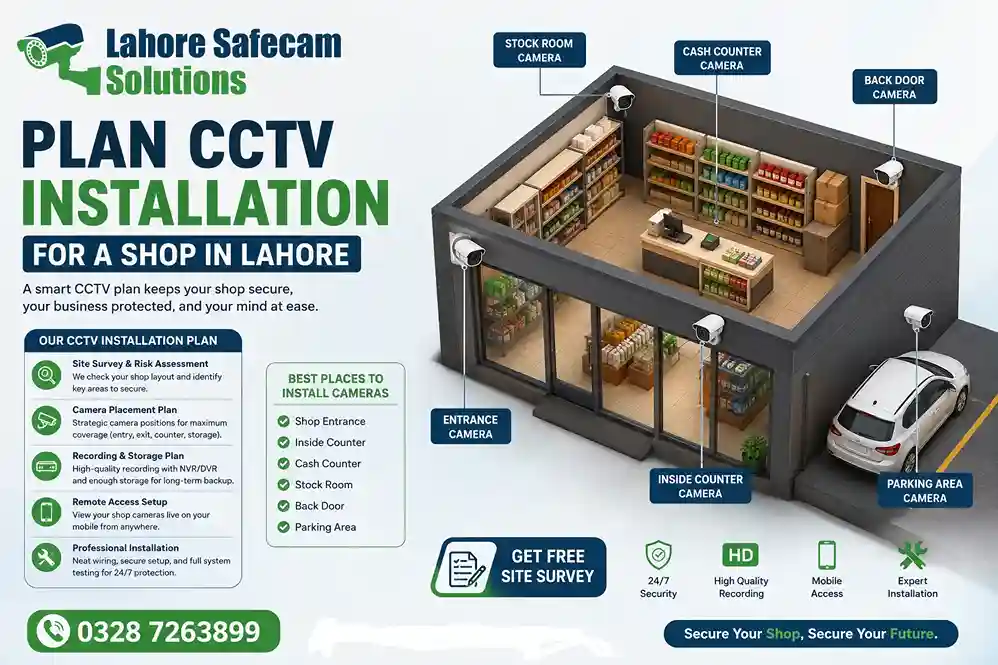
Every retail premises has different risks. A small convenience shop may need strong coverage around the entrance, cash counter and shelves, while a larger retail store may also require cameras in stock rooms, loading areas, staff zones and external parking spaces. A security assessment should identify where valuable goods are stored, where money changes hands and where visibility is poor. Existing blind spots should be checked from both customer and staff perspectives.
Important areas to review include:
- Main entrance and exit
- Cash counter or checkout area
- High-value stock displays
- Aisles and shop floor
- Stock room and storage areas
- Rear or staff-only entrances
- Shutters and external frontage
- Parking or delivery areas where relevant
This assessment helps determine how many CCTV cameras are genuinely needed and where each one should be positioned.
How Many CCTV Cameras Does a Shop Need?
There is no single number that works for every retail business. A small shop may be covered effectively with four cameras, while a larger premises with several aisles, entrances and storage areas may require eight, twelve or more. The correct number depends on the field of view of each camera and the level of detail required. One wide-angle camera may monitor general customer movement, but it may not provide enough detail to identify activity at a cash counter. Rather than calculating camera numbers only from floor area, think in terms of security zones. Each important area should have clear coverage without unnecessary overlap.
Place Cameras Where Useful Evidence Can Be Captured
Camera placement is one of the most important parts of retail CCTV installation. A camera can be technically working but still provide little value if it is mounted too high, pointed directly towards bright light or positioned where shelves block its view. Entrances deserve particular attention. Cameras should capture people entering and leaving at an angle that provides useful facial detail. A camera pointing only at the top of a person’s head may record movement without helping with identification.
Cash-counter CCTV should cover transactions clearly while avoiding unnecessary close monitoring of sensitive information. Cameras around stock areas should be positioned to minimise blind spots caused by shelves, displays or structural columns. Professional planning should consider camera height, viewing angle, lighting and the distance between the camera and the area being monitored.
Choose the Right Camera Type for Each Area
Not every camera in a shop has to be the same. Dome cameras are commonly suitable for indoor areas because of their compact appearance and wide viewing options. Bullet cameras can be useful for entrances, external walls or areas where a more visible security presence is preferred. IP cameras can offer higher-resolution recording, flexible networking and easier integration with NVR systems. Analogue HD cameras may still be suitable for businesses that already have compatible cabling and DVR equipment.
When selecting CCTV cameras for shops, consider:
- Required image resolution
- Indoor or outdoor installation
- Day and night performance
- Viewing distance
- Motion detection requirements
- Existing DVR or NVR compatibility
- Network availability
- Storage requirements
Choosing cameras based on their purpose usually produces better results than purchasing the same model for every location.
Pay Attention to Night Vision and Changing Light
Retail stores experience significant changes in lighting throughout the day. Bright sunlight through a glass entrance can make faces difficult to see, while poorly lit areas may produce grainy footage at night. Night vision should therefore be considered for entrances, external areas and shops that remain partly monitored after closing hours. Camera positioning also matters because infrared light can reflect from glass, shiny surfaces or nearby walls. For shop owners in Lahore, external cameras also need to cope with dust, heat and changing outdoor conditions. Weather-resistant housings and properly protected connections are particularly important where cameras are mounted outside.
Decide Between a DVR and NVR System
DVR and NVR systems both record CCTV footage, but they work with different camera setups. A DVR is generally associated with analogue camera systems using coaxial cabling. An NVR works with IP cameras connected through a network, often using Cat6 cable and PoE technology. A shop that already has usable analogue cabling may be able to upgrade parts of its existing DVR system without replacing everything. A new installation may benefit from an IP-based NVR system when higher resolution, network flexibility and easier future expansion are priorities. The decision should be based on the existing infrastructure, number of cameras, budget and future requirements rather than choosing one recorder purely because it is newer.
Plan CCTV Storage Before Installation
Recording storage is often overlooked until footage is needed. The amount of CCTV footage a system can retain depends on the number of cameras, video resolution, frame rate, recording schedule and hard drive capacity. A higher-resolution system can use significantly more storage than a basic setup. Shop owners should decide how many days of footage they realistically want to keep before choosing the recorder’s hard drive. Some businesses may only require short-term recording, while others may prefer a longer retention period for stock checks, disputes or incident reviews. Motion-based recording can reduce storage use in some situations, although important high-traffic areas may be better recorded continuously during trading hours.
Protect CCTV During Power Interruptions
A CCTV system cannot record if cameras and the recorder lose power. Backup power should therefore be considered when planning shop surveillance. A suitable UPS can help keep the DVR or NVR, cameras and essential network equipment running during shorter interruptions. The backup requirement depends on the number of devices and how long the business wants the system to remain operational. Power supplies should also be installed securely and checked for sufficient capacity. Poor-quality adapters, loose connections and voltage problems can cause cameras to restart, lose video or fail unexpectedly. This is particularly important for retailers who rely on continuous video recording outside normal business hours.
Include Mobile Monitoring and Remote Access
Modern CCTV systems can allow business owners to check their shop through a mobile phone, tablet or computer when they are away from the premises. Remote CCTV monitoring can be useful for checking opening and closing activity, reviewing unusual events or confirming that staff have secured the premises. However, mobile access should be configured correctly. Weak passwords, shared administrator accounts and outdated device settings should be avoided. Login details should only be provided to people who genuinely require access. During installation, remote viewing should be tested on the owner’s device rather than assuming that the system will work once internet access is connected.
Consider Staff and Customer Privacy
CCTV is a security tool, but cameras should still be positioned responsibly. The purpose of each camera should relate to a legitimate security or operational need. Cameras should focus on entrances, stock areas, customer zones and other relevant parts of the shop rather than spaces where surveillance would be unnecessary or intrusive.
Access to recorded footage should also be controlled. Only authorised individuals should be able to view or export recordings, particularly where footage includes customers or employees. Clear internal procedures for who can access footage can make CCTV management more professional as the business grows.
Test the Complete System Before the Installer Leaves
A CCTV installation should not be considered complete simply because every camera appears on a monitor. The complete system should be checked for image quality, recording, playback, night performance, storage, mobile access and power stability. Camera angles should also be reviewed after viewing actual footage.
A useful final test should confirm:
- Every camera displays correctly
- Time and date are accurate
- DVR or NVR is recording
- Stored footage can be played back
- Night vision operates correctly
- Mobile monitoring works
- Important areas are free from blind spots
- Cameras remain stable after power cycling
Testing helps identify small configuration problems before they affect important recordings.
Why Professional Planning Matters for Retail CCTV
A strong shop surveillance system is built around the property rather than around a camera package. The cheapest system may not provide the required detail, while an expensive setup can still perform poorly if cameras are badly positioned. Professional CCTV installation for shops in Lahore should take account of the shop layout, security risks, lighting, recording requirements, network setup, power supply and future expansion. An experienced installer should also explain why particular cameras and locations are recommended. This gives the business owner a clearer understanding of how the surveillance system protects the premises and where its limitations are.
Plan Your Shop CCTV Around Real Security Needs
Effective Lahore Safecam Solutions is less about installing the maximum number of cameras and more about covering the right areas properly. Entrances, cash counters, stock, storage, and blind spots should guide the system design. By planning camera positions, storage, backup power, recording equipment and mobile access before installation, retail businesses can create a surveillance system that remains useful long after the cameras are fitted. A properly planned system should provide clear footage, reliable recording and practical monitoring without making the setup unnecessarily complicated.
Frequently Asked Questions
Where should CCTV cameras be installed in a retail shop?
Priority areas normally include entrances, cash counters, high-value stock areas, aisles, storage rooms and rear access points. The exact positions depend on the shop layout and potential blind spots.
Which CCTV camera is best for a shop?
The best camera depends on the location. Indoor dome cameras may work well for general shop-floor coverage, while bullet or weather-resistant cameras may be more appropriate for entrances and external areas.
Should a retail shop use DVR or NVR?
Both can work effectively. DVR systems suit many analogue installations, while NVR systems are designed for IP cameras and may offer greater flexibility for new or expanding surveillance systems.
Can shop CCTV work during load shedding?
CCTV equipment can continue operating during a power interruption when the cameras, recorder and essential network equipment are connected to a correctly sized backup power system such as a UPS.
Can I watch my shop CCTV on my phone?
Many current DVR and NVR systems support mobile monitoring when remote access is configured correctly and the recorder has a suitable internet connection.