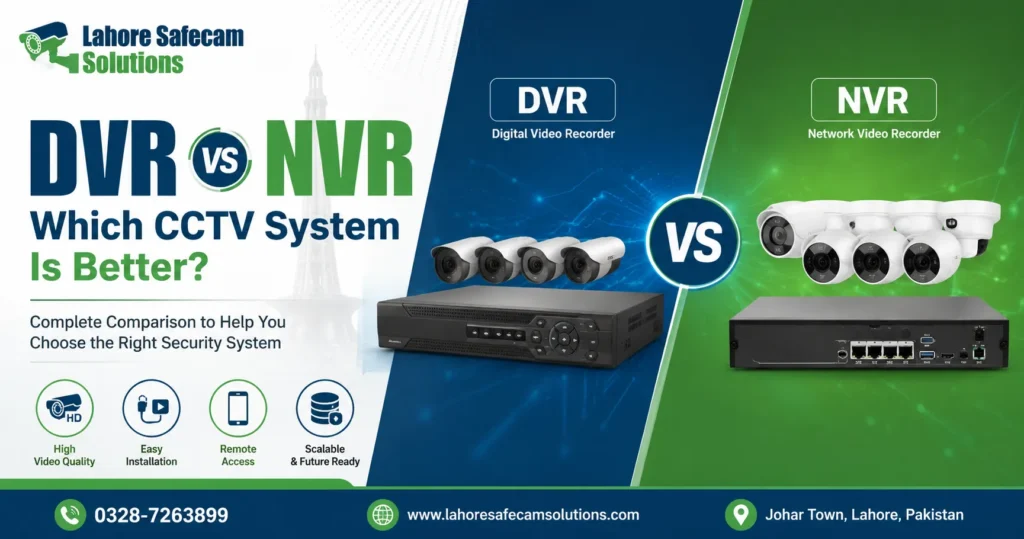
Choosing CCTV cameras is only part of planning a reliable security system. You also need to decide how the footage will be recorded, stored, and accessed. This is where the DVR vs NVR decision becomes important. A DVR, or Digital Video Recorder, is commonly used with analogue CCTV cameras. An NVR, or Network Video Recorder, is designed around IP cameras that send video through a network connection.
Both can provide dependable surveillance, but they suit different properties, budgets and installation requirements. For homeowners, shop owners and businesses in Lahore, the better choice depends on more than image resolution. Existing cabling, the number of cameras, future expansion, storage requirements, remote viewing and backup power should all be considered before choosing a recorder.
DVR vs NVR: What Is the Main Difference?
The main difference between DVR vs NVR systems is how the cameras send and process video. With a traditional DVR system, analogue cameras transmit their video signal to the recorder through a coaxial cable. The DVR receives that signal and handles the video recording and storage. An NVR works with network or IP cameras. These cameras process video before sending a digital stream across an Ethernet network to the recorder.
| Feature | DVR | NVR |
| Typical camera type | Analogue camera | IP camera |
| Common cabling | Coaxial cable | Cat5e or Cat6 Ethernet |
| Video transmission | Analogue signal | Digital network stream |
| PoE support | Usually no | Common on PoE NVRs |
| Expansion | Good for fixed systems | Usually more flexible |
| Existing cabling | Useful where coax is installed | Better suited to network cabling |
| Remote access | Available on compatible systems | Available on compatible systems |
Neither technology is automatically right for every property. The layout and purpose of the CCTV system matter more than choosing one simply because it is newer.
What Is a DVR CCTV System?
A Digital Video Recorder is widely associated with analogue CCTV systems. Cameras are normally connected to the DVR using coaxial cabling and BNC connections. Separate power wiring may also be required depending on how the installation is designed.
A DVR system can make practical sense when a Lahore property already has usable CCTV cabling. If existing cameras and cables remain suitable, replacing the recorder or upgrading compatible cameras may be more economical than installing an entirely new network-based surveillance system.
Modern analogue systems should not automatically be confused with very old, low-quality CCTV. Current technologies can support HD video and useful remote monitoring features, although capability varies significantly between models.
A DVR may be suitable when:
- Existing coaxial CCTV wiring is already installed
- The required number of cameras is unlikely to change
- Budget is a major consideration
- A straightforward home or shop CCTV system is required
- The property does not need advanced IP-camera features
The important point is compatibility. Camera format, recorder specification, resolution and channel capacity should be checked before equipment is purchased.
What Is an NVR CCTV System?
A Network Video Recorder is used primarily with IP CCTV cameras. Instead of sending an analogue signal directly to the recorder, an IP camera communicates through a network. Cameras may connect directly to PoE ports on the NVR, through a PoE switch, or through the property’s wider LAN depending on the system design. Power over Ethernet can be particularly useful because one Ethernet cable can carry both network data and electrical power to a compatible camera.
This can simplify cabling in many installations, although professional planning is still important for cable distance, switch capacity, network security and power requirements. An NVR CCTV system is often considered for modern homes, offices, warehouses and commercial properties where higher-resolution cameras, network flexibility or future expansion are important.
Which Gives Better CCTV Image Quality?
When people compare DVR vs NVR, image quality is often the first concern. However, the recorder alone does not determine video quality.
- Resolution depends on the camera sensor, lens, lighting conditions, encoding settings, recording resolution and recorder compatibility.
- IP systems are commonly available with higher resolutions and more advanced camera-side features, which is one reason NVR systems are popular for installations where identifying faces, vehicle details or activity across larger areas matters.
- A 2MP camera may be sufficient for general monitoring in one area, while 4MP, 5MP or 4K cameras may be considered where more detail is required.
- Higher resolution also creates larger amounts of video data. That means CCTV storage capacity and bandwidth must be planned properly rather than simply selecting the highest megapixel figure available.
DVR vs NVR Cabling: Which Is Easier to Install?
A DVR system commonly uses coaxial cable for video, with power supplied separately or through an appropriate combined cable arrangement. An NVR installation usually uses Cat5e or Cat6 Ethernet cable. With a PoE CCTV system, power and data can travel through the same Ethernet connection.
For a new CCTV installation, network cabling can offer a clean and flexible setup. But if a building already has good coaxial wiring in place, replacing all of it simply to move to an NVR may create unnecessary work. This is why the DVR vs NVR choice should start with a site assessment rather than the recorder specification sheet. For an existing Lahore home or shop, the condition and route of the installed cabling can significantly affect the most practical upgrade path.
Can DVR and NVR Systems Work Without Internet?
A common misunderstanding is that an NVR needs an active internet connection to record CCTV footage. A properly configured NVR can record IP cameras over the local network without internet access. A DVR can also continue recording connected cameras without internet access. Internet becomes important when you want features such as remote mobile viewing, off-site alerts or certain cloud-connected services. This distinction matters when planning CCTV for a property where internet reliability is a concern. Local recording should not depend entirely on an external internet connection.
Which System Is Better for Remote CCTV Monitoring?
Both modern DVR and NVR systems may support remote viewing through a mobile application, desktop software or browser-based platform, depending on the manufacturer. An NVR does not automatically provide better remote viewing simply because it is network-based.
The quality of the experience depends on:
- Recorder and camera software
- Internet upload speed
- App support
- Firmware maintenance
- Network configuration
- User permissions
- Cybersecurity settings
Default passwords should always be changed and recorder firmware should be kept up to date where manufacturer updates are available.
For IP systems using equipment from different manufacturers, interoperability also deserves attention. ONVIF provides profiles designed to help compatible IP security products work together. Profile G covers recording and storage functions, while ONVIF now recommends Profile T for newer video streaming interoperability as Profile S is being phased out. Even so, buyers should confirm compatibility between the exact camera and recorder models instead of assuming every network camera will support every feature on every NVR.
What About CCTV Storage?
A CCTV recorder usually stores footage on a hard disk drive installed inside the unit. Surveillance HDD products such as Western Digital Purple or Seagate SkyHawk are commonly associated with CCTV recording environments.
The amount of storage you need depends on factors including:
- Number of cameras
- Camera resolution
- Frame rate
- Video compression
- H.264 or H.265 encoding
- Continuous or motion-based recording
- Number of days of footage required
A four-camera home system does not have the same storage requirement as a 16-camera commercial surveillance system. Before choosing between DVR vs NVR, decide how long you want footage retained. Seven days, two weeks and one month of recording can require very different storage capacities.
Which Is Easier to Expand?
NVR systems generally offer more flexibility for network-based expansion, particularly when a property already has suitable Ethernet infrastructure. For example, an 8-channel NVR might initially operate with four IP cameras while leaving room for additional cameras later. However, channel count still matters. You cannot assume that adding cameras is unlimited simply because the cameras use a network.
The recorder must support the required number of channels, incoming bandwidth, camera resolutions and storage load. The same principle applies to DVR systems. A 4-channel recorder limits the number of directly supported camera channels, so planning future requirements before installation can save the cost of replacing the recorder later.
Is NVR More Expensive Than DVR?
An NVR-based CCTV installation can cost more depending on camera specifications, network hardware, storage and installation requirements. But comparing only recorder prices gives an incomplete picture. Suppose a Lahore property already has good coaxial cabling and only needs straightforward surveillance. A compatible DVR-based upgrade may provide better value. For a new office where higher-resolution IP cameras, PoE, remote management and future expansion are important, investing in an NVR system may make more sense over the long term.
Which recorder is cheaper? Which complete CCTV system meets the property’s security requirements without paying for unnecessary equipment or creating an upgrade problem later?
DVR or NVR for a Lahore Home?
For many homes, either system can work well when properly designed. A DVR may suit a house where analogue cameras and coaxial wiring are already installed and the owner wants an affordable upgrade. An NVR may be preferable for a new CCTV installation where the homeowner wants IP cameras, PoE cabling, higher resolutions and easier future expansion. Property size also matters. A small house with four cameras has very different requirements from a larger property covering several entrances, parking areas, boundary walls and outdoor spaces. Before choosing DVR vs NVR for home security, identify exactly what each camera needs to see.
Which Is Better for Lahore Shops and Businesses?
Commercial properties often require greater scalability. A small shop may only need a few cameras covering the entrance, counter, customer area and stock room. A warehouse, office building or larger commercial property may need many more channels, longer recording retention and higher-detail footage. Network video systems can be particularly useful where cameras need to operate across a larger structured network. ONVIF describes network video storage as systems that receive media over an IP network and save it to permanent storage, which reflects the network-based architecture behind modern NVR deployments. However, existing infrastructure should still be assessed before replacing a functioning analogue system solely for the sake of moving to IP.
Do DVR and NVR Systems Need Power Backup?
Yes, if you want CCTV to continue operating during a power interruption. A recorder cannot capture useful footage if the recorder, cameras or necessary network equipment lose power.
Depending on the installation, backup planning may include:
- DVR or NVR
- CCTV camera power supply
- PoE switch
- Router
- Network equipment
- Display equipment where required
A suitable UPS can help maintain the surveillance system during shorter interruptions. For properties in Lahore, backup power should be considered during the design stage rather than added as an afterthought. The required UPS capacity depends on the total electrical load and the amount of backup time expected.
DVR vs NVR: Which One Should You Choose?
There is no universal winner in the DVR vs NVR comparison. Choose based on the property rather than the marketing around the technology. A DVR can be the sensible option where existing analogue infrastructure is usable, security needs are straightforward and cost control matters. An NVR is often the stronger option for a new IP CCTV installation where higher-resolution network cameras, PoE, scalability and flexible system design are priorities.
- Camera type: Are you using analogue cameras or IP cameras?
- Existing wiring: Is coax already installed, or are you starting from scratch?
- Required detail: What resolution is actually needed at each camera position?
- Storage: How many days of footage should be retained?
- Expansion: Will more cameras be added later?
- Remote access: Do you need CCTV viewing from your phone or another location?
- Power backup: How will recording continue during electricity interruptions?
- Budget: What is the total installed cost, not just the recorder price?
Get the Right CCTV Recorder for Your Lahore Property
The best CCTV system is not necessarily the system with the most cameras, highest resolution or newest recorder. It is the one designed around the areas you need to monitor, the footage detail you require, your storage needs and the infrastructure available at the property. Lahore Safecam Solutions can help homeowners and businesses in Lahore assess their CCTV requirements and choose a suitable recording setup, whether that involves a DVR-based system, an NVR with IP cameras or an upgrade to an existing surveillance installation. Planning the recorder, camera channels, cabling, storage, remote viewing and backup power together gives you a CCTV system that is easier to manage today and less likely to need an avoidable replacement later.
Frequently Asked Questions: DVR vs NVR
Is NVR better than DVR for CCTV?
NVR systems generally provide greater flexibility for modern IP-camera installations, but a DVR can still be a practical choice where analogue cameras and existing coaxial wiring meet the property’s requirements.
Does an NVR require internet?
No. An NVR can record compatible IP cameras across a local network without internet access. Internet is generally required for remote viewing and cloud-dependent functions.
Can a DVR work without internet?
Yes. A DVR can record locally without an internet connection as long as the recorder, cameras and required power supplies are working.
How many cameras can a DVR or NVR support?
It depends on the recorder. Common systems include 4-channel, 8-channel and 16-channel models, while larger systems may support significantly more cameras.
Is PoE available on every NVR?
No. Many NVRs include built-in PoE ports, but not every model does. Some installations use a separate PoE switch, so the recorder specification should be checked before purchasing.