Many people think security camera installation is just about fixing cameras on walls and turning them on. In reality, a proper installation process involves planning, technical decisions, and testing that directly affect how well your system performs over time.
Whether you are installing cameras for a home, office, or commercial property, understanding the process of security camera installation helps you avoid poor coverage, wasted money, and future system failures. Below is a step-by-step explanation of how professional installation is done the right way.
Step 1: Initial Consultation and Requirement Assessment
The process starts with understanding your security needs. A professional installer will ask questions about:
- Property type (home, office, shop, warehouse)
- Areas you want to monitor
- Day and night security concerns
- Indoor and outdoor coverage
- Budget and future expansion plans
This stage is important because no two properties have the same security requirements. A rushed or generic approach often leads to blind spots and poor results.
Step 2: Site Survey and Layout Planning
After the initial discussion, a proper site inspection is carried out. During this visit, the installer evaluates:
- Entry and exit points
- Lighting conditions
- Blind spots
- Wall structure and mounting points
- Power supply and cabling routes
This step determines where cameras should be placed for maximum coverage. Skipping a site survey is one of the most common reasons CCTV systems fail to deliver usable footage.
Step 3: Selecting the Right Camera Types
Based on the site survey, the installer recommends suitable camera types, such as:
- IP cameras for high-resolution monitoring
- Analog cameras for basic surveillance needs
- Dome cameras for indoor areas
- Bullet cameras for outdoor security
- Wired or wireless systems, depending on the layout
Choosing the right camera type ensures the system performs well in local conditions, including low light and power fluctuations.
Step 4: Cabling and Power Setup
Once the plan is finalised, the physical installation begins. This includes:
- Running cables neatly through walls or conduits
- Connecting cameras to power sources
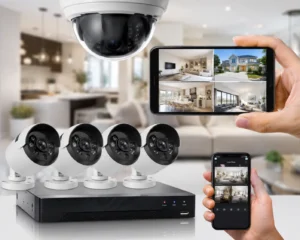
- Setting up DVR or NVR recording systems
- Ensuring proper grounding and safety
Good cable management is essential for system stability and long-term reliability. Poor wiring can lead to signal loss, system downtime, and maintenance issues later.
Step 5: Camera Mounting and Angle Adjustment
Cameras are then mounted securely at the planned locations. This step focuses on:
- Correct height to prevent tampering
- Proper angles to avoid glare or obstruction
- Adjusting the field of view for full coverage
- Ensuring night vision works correctly
Even high-quality cameras perform poorly if the angles are wrong. This is where professional experience makes a noticeable difference.
Step 6: System Configuration and Network Setup
After physical installation, the system is configured. This includes:
- Setting recording schedules
- Configuring motion detection
- Adjusting video quality and storage settings
- Connecting the system to mobile apps or remote access
For IP and smart systems, proper network configuration ensures smooth remote viewing without lag or disconnections.
Step 7: Testing and Quality Checks
Before handover, the entire system is tested thoroughly:
- Day and night footage checks
- Motion detection accuracy
- Storage and playback testing
- Mobile and remote access verification
Testing ensures the system performs correctly under real conditions, not just during installation.
Step 8: User Training and System Handover
A professional installation includes basic user guidance. This typically covers:
- How to view live footage
- How to access recordings
- How to use mobile apps
- Basic troubleshooting tips
Clear instructions help users feel confident using their system without confusion.
Step 9: After-Sales Support and Maintenance
The installation process does not end on installation day. Reliable providers offer:
- Ongoing technical support
- Maintenance options
- Firmware updates
- System health checks
Regular maintenance helps extend the life of the system and prevents unexpected failures.
Common Mistakes to Avoid During Installation
- Skipping the site survey
- Choosing cameras based only on price
- Ignoring night-time performance
- Not planning for future expansion
- Installing without backup power options
Avoiding these mistakes saves time, money, and frustration.
Final Thoughts
The process of security camera installation is more detailed than most people expect. From planning and camera selection to testing and after-sales support, every step plays a role in how effective your system will be.
A properly installed security camera system offers long-term protection, reliable footage, and peace of mind. Cutting corners during installation often leads to poor performance and costly fixes later. For professional guidance and expert security camera installation, Lahore Safecam Solutions provides reliable solutions for homes and businesses. Call 0328-7263899 to book your free consultation or site survey. network for your business, understanding the process ensures you get the most out of your investment.
Frequently Asked Questions (FAQs)
How long does the security camera installation process take?
Most home security camera installations take 4 to 6 hours. Larger offices or commercial properties may require one to three days, depending on system size and cabling work.
What is the first step in security camera installation?
The first step is a site assessment to understand security needs, camera placement, lighting conditions, and power availability.
Do security cameras need the internet to work?
Security cameras do not require the internet for recording footage. The internet is only needed for remote viewing through mobile apps or online access.
Is professional installation necessary for security cameras?
Yes. Professional installation ensures proper camera angles, correct wiring, reliable recording, and long-term system performance.
Where should security cameras be installed?
Security cameras should be placed at entry points, parking areas, boundary walls, and blind spots for effective coverage.
Can security cameras work during power outages?
Yes, security cameras can function during power outages if connected to a UPS or battery backup system.
How often should security cameras be maintained?
Security cameras should be checked at least every 3 to 6 months to clean lenses, update software, and ensure proper functioning.