Setting up a wireless CCTV camera system is one of the most effective ways to protect your home, shop or office in Lahore. Many people assume that wireless cameras are a simple plug-and-play solution, but proper installation still requires careful positioning, configuration and testing to ensure everything works smoothly. When done correctly, you get reliable monitoring, strong WiFi connectivity and a security system that delivers the protection you expect.
If you’re planning to Install wireless CCTV cameras for the first time, understanding what is included in a Wireless CCTV camera installation in Lahore will help you make informed decisions. Whether you’re securing a house in DHA, a shop in Liberty Market or a warehouse on Mall Road, choosing the right installation approach is essential.
1. On-Site Inspection and Assessment
Every installation begins with a quick assessment of your property. A technician looks at:
• Entry points such as gates, main doors and parking areas
• WiFi strength in different spots
• Lighting conditions during day and night
• Outdoor exposure to heat, rain and dust
• Power source availability
This helps identify the best positions for your wireless CCTV cameras. A strong assessment ensures the system performs well and covers your most vulnerable areas.
2. Choosing the Right Camera Placement
Camera placement is one of the most important parts of a proper setup. Professional installers look for angle coverage, height, blind spots and environmental factors. Ideal areas include:
• Main entrance
• Driveway or garage
• Side pathways
• Rooftop
• Shop front or shutter
• Office reception area
Correct placement increases the effectiveness of motion detection, improves visibility and ensures clear recordings in both day and night conditions.
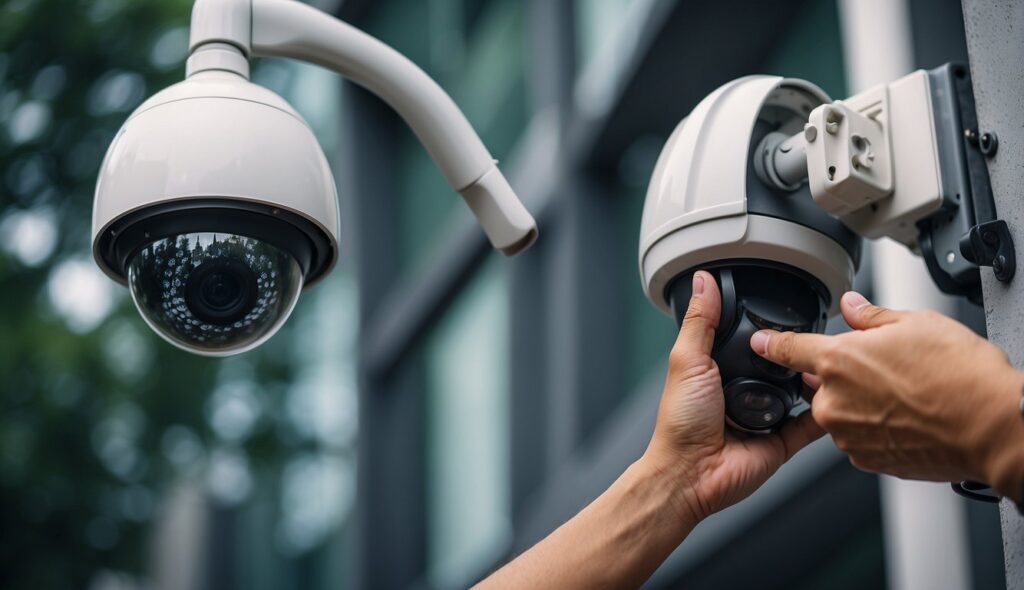
Camera placement and angle setup, outdoor wireless CCTV installation.
3. Mounting and Fixing the Camera
After the placement is decided, the technician mounts the camera securely. This usually includes:
• Drilling holes (if required)
• Installing the mounting bracket
• Ensuring stable positioning
• Hiding or securing power cables
Indoor cameras may not require drilling, but outdoor cameras must be mounted firmly to resist weather conditions, especially during Lahore’s monsoon season.
CCTV camera fitting services Lahore, wireless camera mounting.
4. Connecting the Camera to Power
Wireless CCTV cameras do not need video cables, but they do require power unless you choose a battery-powered model. The technician checks:
• The nearest power socket
• Cable length
• Safety of the power connection
• Weather protection for outdoor adapters
Battery-powered models are more flexible but often cost slightly more due to the built-in rechargeable battery.
5. WiFi Configuration and Connectivity Testing
A wireless security camera setup depends heavily on good WiFi. During installation, the technician:
• Connects the camera to your WiFi network
• Ensures signal strength is stable
• Tests live view function
• Sets the right streaming quality
• Checks for lag or disconnection issues
If the WiFi is weak, the installer may suggest repositioning the router or using a WiFi extender.
WiFi-enabled CCTV installation, wireless CCTV installation services Lahore.
6. Mobile App Setup and Account Registration
Modern wireless cameras rely on mobile apps for monitoring. Your installer will help you:
• Install the camera’s official app
• Create or log into your account
• Add your camera to the app
• Turn on notifications and alerts
• Configure motion detection zones
• Sync cloud storage or SD card options
This step is important because most customers want easy access to live footage from anywhere.
CCTV camera app configuration, remote viewing setup.
7. Adjusting Motion Detection and Alerts
Motion detection is a key feature of wireless CCTV systems. Incorrect settings can cause unnecessary alerts, while weak settings may miss suspicious movement. The installer ensures:
• Proper sensitivity level
• Detection zones are set correctly
• Human/vehicle filtering (if supported)
• No false alerts from pets or passing cars
This improves the reliability of your system, especially in busy areas of Lahore.
8. Storage Setup – SD Card or Cloud
A professional technician helps you choose the best storage option:
SD card storage:
• Budget-friendly
• No monthly cost
• Works even without internet
Cloud storage:
• Safer for long-term access
• Accessible from any device
• Automatic backup in case of theft
Your installer will format the SD card or connect your camera to a cloud plan, depending on your preference.
9. Full System Testing
Before completing the job, the technician tests everything:
• Live view quality
• Audio clarity (if two-way audio is available)
• Night vision performance
• Recording playback
• WiFi stability
• Motion alerts
• Storage recording
This ensures your wireless CCTV system works exactly as expected.
10. User Training and Final Guidance
Once everything is installed, Lahore Safecam Solutions provides quick guidance on:
• How to use the app
• How to view past footage
• Changing WiFi settings
• Updating passwords for security
• Basic troubleshooting
• When to clean outdoor lenses
This ensures you can manage your CCTV system confidently without needing constant support.
Why Choose Lahore Safecam Solutions?
Wireless CCTV camera installation may look simple, but a good installation makes the difference between reliable security and a system that fails when you need it most.
Lahore Safecam Solutions offers:
• Professional installers
• Clean and secure mounting
• Strong WiFi configuration
• Expert camera placement
• App setup and full testing
• Affordable installation rates
• Support for homes, shops and offices
Whether you live in a residential area like Bahria Town or manage a business in Gulberg, our technicians ensure your wireless CCTV system performs at its best.
Conclusion
At Lahore Safecam Solutions, we provide professional and reliable wireless CCTV camera installation for homes, shops and offices across Lahore. Our team focuses on proper camera placement, secure mounting and complete WiFi configuration to ensure your system works smoothly from day one.
We handle everything from app setup to storage configuration, including motion alerts, night vision testing and recording verification. Whether you need a single camera for your main entrance or a full wireless security system for your commercial property, we deliver a clean and efficient installation.
Our services cover all major areas of Lahore, including DHA, Bahria Town, Gulberg, Johar Town, Liberty, Model Town, Garden Town and more. With expert guidance, affordable rates and dependable support, Lahore Safecam Solutions helps you protect what matters most.
Frequently Asked Questions (FAQs)
How long does wireless CCTV camera installation take in Lahore?
Most installations take 30–60 minutes per camera, depending on placement and WiFi strength.
Do wireless CCTV cameras work without the internet?
They can record to an SD card, but you need WiFi for mobile viewing and alerts.
Is drilling required for wireless CCTV installation?
Outdoor cameras usually need drilling. Indoor cameras may not.
Does Lahore Safecam Solutions install battery-powered cameras?
Yes. Installation includes mounting, app setup and testing.
What is the best place to install a wireless CCTV camera?
Main entrances, driveways, shops fronts and rooftops with good visibility.